
For years, the goal for every local business was simple: show up in Google’s map pack. That hasn’t changed. What has changed is that your next client might never open Google at all. They might just ask ChatGPT.
On November 10, 2026, OpenAI launched Businesses in ChatGPT, a free beta that lets you claim your business profile inside ChatGPT. Think of it as ChatGPT’s version of a Google Business Profile. Here’s why it matters, how to claim yours step by step, and what it can and can’t do so far.
This is a brand-new feature that’s still in development. We’ll keep updating this post as OpenAI adds more and as we learn what works.
Your Google Business Profile Is Still the Foundation
Before we talk about ChatGPT, let’s be clear: Google is still where most local searches happen. In BrightLocal’s 2026 Consumer Search Behavior study, 52% of consumers started their most recent local search on Google Search and another 9% started on Google Maps. 71% used Google Search at some point along the way.
That’s why ranking in the map pack (the three businesses that show up with the map) matters so much. People don’t shop around for long. BrightLocal found that 72% of consumers look at three or fewer businesses before deciding, and 75% decide in under 30 minutes. If you’re not in those top three spots, you’re often not in the conversation.
Your Google Business Profile is what gets you there: the right categories, accurate hours and contact info, photos, posts and a steady flow of reviews. And here’s the part most owners miss. That same information feeds the AI tools too. SOCi’s 2026 Local Visibility Index found that only 68% of business contact information on ChatGPT and Perplexity matches what’s on Google Business Profiles. Messy data on Google can follow you into AI answers.
People Are Already Asking ChatGPT for Local Businesses
The shift happened fast. According to BrightLocal’s 2026 Local Consumer Review Survey, use of ChatGPT and other AI tools for local recommendations jumped from 6% to 45% in a single year. That made AI the third most popular source of business recommendations, behind only Google and Facebook.
A few more numbers worth knowing:
- 31% of consumers now use AI tools for local business recommendations at least once a month (BrightLocal).
- 23% used AI during their most recent local business search (BrightLocal).
- 1.2 billion people use ChatGPT every week, according to OpenAI (VentureBeat).
- 1.2%: the share of local business locations ChatGPT actually recommended in SOCi’s 2026 Local Visibility Index, which looked at more than 350,000 locations.
That last number is the opportunity. Lots of people are asking, and very few businesses are showing up. Also notice that 43% of people who start on AI go on to check Google (BrightLocal). ChatGPT and Google work together. You need both.
What Businesses in ChatGPT Is (and What It Can Do So Far)
Businesses in ChatGPT runs through a new area called Business Hub, in the ChatGPT sidebar. OpenAI’s announcement says businesses can claim their listing, manage their information and see how people engage with them on ChatGPT.
Here’s what you get right now:
- A verified profile. After you verify your identity, a blue check appears on your listing.
- Control over your details. Update your business description, category, industry type, phone, email, website, photos, address and hours.
- Insights. See how many times ChatGPT mentioned your business in the last 7 days and the last 28 days. For a local business, a mention counts when your location appears in a result, even if nobody clicks.
- It’s free. No ads account or paid ChatGPT plan is required.
What it doesn’t do yet:
- It doesn’t guarantee rankings. OpenAI says ChatGPT keeps making its own recommendations. Claiming doesn’t promise better placement or more sales.
- You can’t add a new local listing. Local stores and restaurants can only claim a listing that already exists in the U.S. (OpenAI Help Center).
- The Business Agent isn’t ready yet. Your dashboard has a “Get ready to chat with customers” card, but it needs a Business Agent first. OpenAI is still working on the agent builder and rolling it out gradually to different types of businesses.
- You won’t see conversations. OpenAI doesn’t share users’ chats with businesses. You only see totals.
One more thing: OpenAI may create a listing for your business whether or not you claim it (BizIQ). So you might already be in ChatGPT, with details you never checked.
How to Claim Your Business on ChatGPT, Step by Step
Plan on about 20 minutes of hands-on time, spread over a few sittings while OpenAI reviews your claim (The Rundown). Before you start, have your business phone, website login and a photo ID handy.
- Sign in with the right account. Go to chatgpt.com/business-hub, or open Business Hub from the ChatGPT sidebar. Use a ChatGPT account the business owns, not an employee’s or your agency’s. Any plan works, including the free one.
- Search for your listing. Try your business name, your website address and your city. Check the street address on each result so you pick the right one. Can’t find it? Search again using your business name together with your full street address. If there’s still no listing, you may be able to create one: online businesses get a Create option to build a new profile. Local businesses, like stores, restaurants and offices, can only claim an existing U.S. listing for now, so check back as OpenAI expands the beta. If a listing shows Contact support, it’s locked and you’ll need to go through OpenAI support.
- Start your claim. Select Get started, confirm the account that will manage the business, and continue. This also accepts OpenAI’s Businesses in ChatGPT Terms. Then choose how customers reach you: a physical location, an online store or a service.
- Verify that it’s your business. You can verify in one of two ways: with your business phone number, or by adding a TXT record to your website’s DNS. If DNS sounds technical, your web host or developer can add the record for you in a few minutes.
- Verify your identity. Next, verify your ID through Persona. This can be the person who created the account, and it’s just personal identification. You’ll get several options, including a driver’s license, passport, passport card or visa. You need this step before you can edit your profile or see your data.
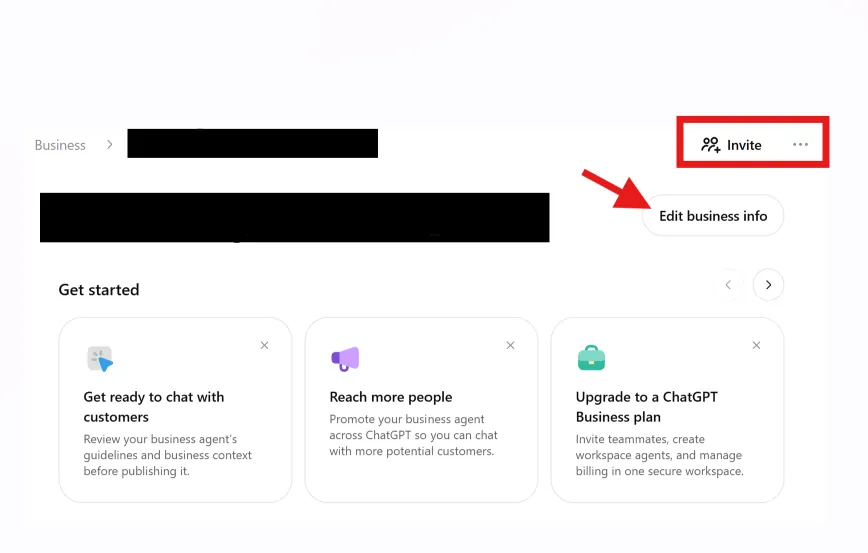
- Update your profile. Once you’re verified, your dashboard has a button to edit your business details. You can update your About section (a short business description and your business category), your contact information (phone number, business email and website), your photos, and your location and hours. You can also select your industry type. Make sure everything matches your Google Business Profile and website exactly. Tip for 24-hour businesses: there’s no “open 24 hours” option yet. The earliest opening time you can pick is 12:45 AM and the latest closing time is 11:45 PM, so use those to get as close as possible.
- Add your team or agency. The admin who claimed the business can add teammates and give an agency access. Each person signs in with their own ChatGPT account. Multiple locations are claimed one at a time.
- Check your insights. Your dashboard shows how many times ChatGPT mentioned your business in the last 7 days and the last 28 days. That’s data straight from ChatGPT itself, which you can’t get anywhere else. Numbers can take a little time to show up, so a blank dashboard at first is normal. You’ll also see a “Get ready to chat with customers” card. It needs a Business Agent to work, and OpenAI is still building the agent builder, so it isn’t available yet.
OpenAI doesn’t give a review timeline. It emails you each decision (The Rundown).
What This Means for Law Firms
People don’t just ask ChatGPT “best lawyer near me.” They describe their situation: “I got a DUI in Phoenix, what should I do?” or “How do I file for custody in Arizona?” Those are high-intent questions, and ChatGPT often answers with firm names.
For law firms, that means a few things:
- Claim your listing now. If your firm has an existing U.S. listing, claim it before someone else gets to it. Owners can dispute a claim someone else has made, but it’s easier to be first (Mad Robot).
- Keep every detail consistent. Your firm name, address, phone, practice areas and attorney names should match across your Google Business Profile, website, Avvo, the State Bar directory and ChatGPT.
- Stay compliant. Your ChatGPT profile is still attorney advertising. Keep descriptions factual and follow your state bar’s advertising rules, just like you would on your website or Google profile.
- Watch the topics. Business Hub shows which topics ChatGPT links to your firm. If it thinks you’re a personal injury firm and you only do family law, that’s something to fix fast.
- Each office is its own claim. Have more than one location? Claim each one separately.
The firms that move early get to shape how ChatGPT describes them while competition is still light.
Get In Early
It’s always better to be early to the game. When Google Business Profiles were new, the businesses that set them up first had a head start for years. ChatGPT is at that same point right now.
This is a beta, and it will change. OpenAI hasn’t ruled out charging for some features later. We’ll keep updating this post as new features roll out, as more business types become eligible and as we see what actually moves the needle for our clients.
Want help getting your business ready for both Google and ChatGPT? Minerva Digital Marketing Consultants helps local businesses and law firms get found where their clients are searching. Call us at (352) 839-4465 or visit minervadmc.com to get started.
Sources
- Introducing Businesses in ChatGPT, OpenAI
- Setting up your business on ChatGPT, OpenAI Help Center
- OpenAI lets you claim your business in ChatGPT, VentureBeat
- How to Claim and Set Up Your Business on ChatGPT, The Rundown
- Consumer Search Behavior 2026, BrightLocal
- Local Consumer Review Survey 2026, BrightLocal
- Local SEO Statistics, BrightLocal (includes SOCi Local Visibility Index figures)
- Businesses in ChatGPT: What Business Owners Need to Know, BizIQ
- Businesses in ChatGPT: verified profiles and AI Business Agents, Mad Robot
